
6.1 KiB
Executable File
6.1 KiB
Executable File
MKRTOS 是什么
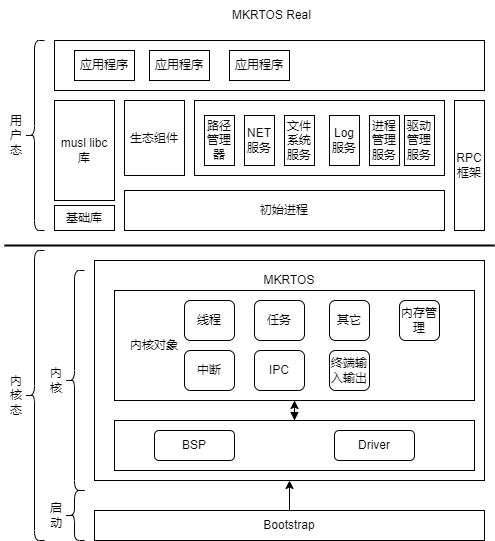
- MKRTOS 全称是 Micro-Kernel Real-Time Operating System,中文名字是微内核实时操作系统。MKRTOS是首款支持MCU的真微内核开源操作系统,内核只包含thread、task、内存管理等功能,其它文件系统、驱动等都在用户态实现,用户态支持应用程序动态加载,同时兼容 Posix 标准的操作系统,适用于各类嵌入式场合。MKRTOS架构图如下:

MKRTOS 的目标
-
- Real microkernel design, with high stability, high anti-failure design, suitable for industrial control, Internet of things and other fields.
-
- Out of the box, supports multiple platforms.
-
- Porting is convenient and fast, the kernel only needs 2 driver support (serial port and systick).
-
- Simple design, support for multi-process (MPU process protection), multi-threading, support for MCU.
-
- RTOS design, high real-time performance.
-
- User mode drivers, which are also applications.
MKRTOS支持的处理器架构
| 处理器架构 | 支持的板子 | 进度 |
|---|---|---|
| Cortex-m3 | renode/stm32f103,qemu/stm32f2 | done |
| Cortex-m4 | renode/stm32f4 | done |
| Cortex-m33 | swm34s | done |
| risc-v | Qemu | X |
| ARMv8 | Qemu | X |
设计原则
- 1.服务间数据交互不经过第三方组件。
- 2.服务间最简接口原则。
- 3.内核最小功能原则。
- 4.微内核设计。
MKRTOS 模块支持
已完成
- 1.处理器:默认支持 Cortex-M3 处理器、未来会支持更多
- 2.进程间通信,采用同步通信机制,内核不缓存任何数据。
- 3.内核只需要支持systick以及串口即可启动系统。
- 4.内核采用C语言编写,并使用面向对象的编程方式,功能均被抽象为内核对象。
- 5.内核支持对象:线程对象、进程对象、工厂对象、内存管理对象、Log对象,IPC对象,Futex对象。
- 4.多线程:支持多线程管理,线程与task分离,设计跟合理。
- 5.多进程(MPU实现进程隔离):支持内存空间与对象空间,进程只管理资源。
- 6.irq对象支持,用于内核中断转发到用户态。
- 7.可执行文件:支持bin可执行文件。
- 8.musl libc库支持。
- 9.init进程、process manager支持、path manager支持
- 10.shell服务
- 11.kconfig支持。
- 12.文件系统服务支持(暂时支持fatfs文件系统)。
- 13.Cortex-m4支持,硬件浮点支持。
正在做
- 1.完善内核.
- 2.drv manager服务
- 3.Ext、LittleFs系列文件系统支持
未来支持
- 1.Cortex-M其它系列处理器、RISC-V,龙芯支持。
- 2.多核MCU支持
- 3.虚拟化支持
- 4.支持MMU实现进程隔离。
MKRTOS 用户态生态正在做
- 1.toybox常用命令支持
- 2.ota支持
- 3.ymodem支持
- 4.GUI支持。
- 5.lwip支持。
- 6.modubs支持。
- 7.can通信协议支持。
- 8.AT协议支持。
- 9.其它。
怎么使用?
- 工程采用CMake进行管理,并在Linux下进行开发,建议使用Ubuntu18.04开发。
- GCC编译器采用gcc-arm-none-eabi-5_4-2016q3,也可以使用新版本进行开发。
- Qemu模拟STM32F2,老版本的Qemu对coretx-m3的模拟存在bug,请使用最新版本Qemu8.0及以上。 使用步骤:
- 安装CMake
sudo apt install cmake
- 安装ninja
sudo apt update
sudo apt install ninja-build
sudo apt install cpio srecord
sudo apt install python3
sudo apt install srecord
- 下载gcc
- 直接使用ubuntu命令安装的gcc arm会没有gdb,可以直接到我给定的仓库下载
https://gitee.com/IsYourGod/mkrtos-tools.git
64位系统使用32位gcc,需要安装
sudo apt install libc6-i386
- Qemu
- 1.Qemu可以直接下载官方的进行编译
- 2.也可以从我给定的链接下载
https://gitee.com/IsYourGod/mkrtos-tools.git
- 修改build.sh脚本中GCC路径和GCC库路径
export TOOLCHAIN=/home/zhangzheng/gcc-arm-none-eabi-5_4-2016q3/bin/
export TOOLCHAIN_LIB=/home/zhangzheng/gcc-arm-none-eabi-5_4-2016q3/lib/gcc/arm-none-eabi/5.4.1/armv7-m
- 修改run.sh 和debug.sh中qemu的路径
qemu-system-arm -machine\
 	netduino2 -cpu cortex-m3 \
  	-nographic -m size=2\
   	-kernel $PWD/build/output/kernel.img \
    -S -gdb tcp::$1
- 执行run.sh 输出如下:
st:0x20000000 re:0xf sub:0x400
 region:[xxxxoooo]
st:0x20002000 re:0xf8 sub:0x400
 region:[oooxxxxx]
task alloc size is 6720, base is 0x20001000
exc_regs:8010001 20001db8 20001000
mkrtos init done..
mkrtos running..
 _____ ______   ___  __    ________  _________  ________  ________
|\   _ \  _   \|\  \|\  \ |\   __  \|\___   ___\\   __  \|\   ____\
\ \  \\\__\ \  \ \  \/  /|\ \  \|\  \|___ \  \_\ \  \|\  \ \  \___|_
 \ \  \\|__| \  \ \   ___  \ \   _  _\   \ \  \ \ \  \\\  \ \_____  \
  \ \  \    \ \  \ \  \\ \  \ \  \\  \|   \ \  \ \ \  \\\  \|____|\  \
   \ \__\    \ \__\ \__\\ \__\ \__\\ _\    \ \__\ \ \_______\____\_\  \
    \|__|     \|__|\|__| \|__|\|__|\|__|    \|__|  \|_______|\_________\
                                                            \|_________|
Complie Time:Dec  2 2023 23:22:30
init..
ns svr init...
pm runing..
create thread 0x20002c00
exc_regs:8010b55 20001fb8 20001000
thread bind to 3
cons svr init...
fatfs addr is [0x8036048]
create task is 0x20002a5c
create thread 0x20003400
st:0x20000000 re:0x1 sub:0x8000
 region:[xooooooo]
st:0x20040000 re:0xff sub:0x8000
 region:[xxxxxxxx]
task alloc size is 140132, base is 0x20008000
thread bind to 12
exc_regs:8036049 20008d00 20008000
sh addr is [0x8076664]
create task is 0x20003b84
create thread 0x20004000
st:0x20004000 re:0x1 sub:0x800
 region:[xooooooo]
st:0x20008000 re:0xff sub:0x800
 region:[xxxxxxxx]
task alloc size is 9268, base is 0x20004800
thread bind to 14
exc_regs:8076665 20005f60 20004800
run app num is 2.
register svr, name is /mnt, hd is 16
register [/mnt] success.
mount success

mkrtos:/$ knl main run..

mkrtos:/$
如何交流
- 加群微信或者QQ交流。QQ群:419833232
加入开发者
- 提交一次代码,并联系我。